
Author: Yogesh Mahajan
Every week, small business owners ask me the same question: “Should I use Make.com or Zapier?”
They’ve just spent hours manually copying leads from a web form into their CRM, or their team is still sending follow-up emails by hand, or someone built a spreadsheet “system” that only one person understands. They know automation is the answer. They’ve heard of both tools. And they’re paralyzed by the choice.
I’ve built hundreds of automations across both platforms for small businesses — from fintech startups to e-commerce brands to local service businesses. I’ve seen Make.com save a client 40 hours a month. I’ve seen Zapier set up in 10 minutes and run flawlessly for years. I’ve also seen businesses pick the wrong tool and pay for it in frustration, workarounds, and unexpected costs.
This is the comparison I wish existed when I started: honest, specific, and based on real implementation experience rather than feature marketing.
What this article covers:
- How Make.com and Zapier fundamentally differ
- Full pricing breakdown for small business budgets
- AI automation capabilities in 2026
- Which tool wins for specific use cases
- A direct recommendation based on your situation
Make.com vs Zapier: The Short Answer
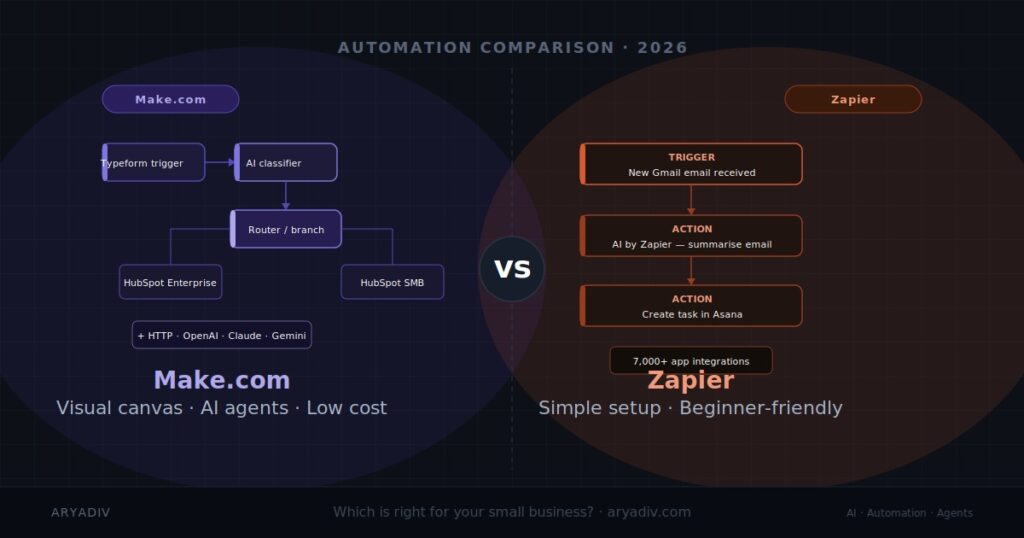
Zapier is easier to set up and better for simple, linear automations — ideal for small businesses with straightforward workflows and no technical staff. Make.com is more powerful and significantly cheaper at scale, making it the better choice for businesses with complex, multi-step automations or data-heavy workflows. For AI agent integration, Make.com currently has a stronger edge.
If you only have two minutes, here’s the full picture:
| Make.com | Zapier | |
|---|---|---|
| Best for | Complex workflows, data routing, AI agents | Simple automations, non-technical teams |
| Free plan | 1,000 operations/month | 100 tasks/month |
| Starting paid price | ~$9/month | ~$19.99/month |
| AI features | Native OpenAI, Claude, Gemini modules + HTTP | AI by Zapier (ChatGPT, Claude actions) |
| Learning curve | Moderate to high | Low |
| App integrations | 1,000+ | 7,000+ |
| Visual builder | Canvas-based (nodes and connectors) | Linear steps (top to bottom) |
| Error handling | Advanced (retry, filters, custom routes) | Basic |
| Best pricing point | High-volume businesses | Low-volume, simple use cases |
What Is Make.com?
Make.com (formerly Integromat) is a visual automation platform that lets businesses connect apps and build workflows using a canvas-based “scenario” builder. Unlike most automation tools, Make.com supports complex branching logic, data transformation, and iterators — making it suited for multi-step automations involving large data sets or conditional routing.
Key facts:
- Founded in 2012 as Integromat, rebranded to Make.com in 2022
- Acquired by Celonis in 2020
- Used by 500,000+ businesses globally
- Processes over 500 million operations monthly
- Headquartered in Prague, Czech Republic
The core concept in Make.com is the scenario — a visual flowchart of connected app modules. Each module does one thing (get data, transform data, send data), and you connect them on a canvas. It looks more like building a diagram than filling out a form, which is both its power and its learning curve.
Make.com charges per operation — every module that executes in a scenario counts as one operation. A 5-step scenario running 1,000 times uses 5,000 operations. This pricing model rewards efficiency: well-built scenarios that do more in fewer steps cost less to run.
What Is Zapier?
Zapier is the most widely used automation platform for small businesses, connecting 7,000+ apps through simple “Zaps” — trigger-action workflows that require no technical knowledge to build. It’s designed for ease of use: most automations can be set up in minutes. Zapier is ideal for teams that want to automate quickly without learning a complex tool.
Key facts:
- Founded in 2011
- Backed by Sequoia Capital and others
- Used by 2.2 million+ businesses globally
- 7,000+ app integrations — the largest library of any automation platform
- Headquartered in San Francisco, California (fully remote company)
The core concept in Zapier is the Zap — a simple trigger → action chain. Something happens in App A (a form is submitted, an email arrives, a row is added to a spreadsheet), and Zapier does something in App B (creates a CRM contact, sends a Slack message, adds a calendar event). Multi-step Zaps can chain several actions together, but the structure stays linear.
Zapier charges per task — each action step that runs counts as one task. A 3-step Zap running 1,000 times uses 3,000 tasks. Like Make.com’s operations, this means more complex workflows cost more to run.
Pricing: Make.com vs Zapier in 2026
Make.com pricing
Make.com’s free plan includes 1,000 operations per month, which is sufficient for most small business pilots. Paid plans start at approximately $9/month (Core, 10,000 ops) and scale to $16/month (Pro, 10,000 ops with advanced features) and $29/month (Teams). Operations are consumed per action in a workflow, not per workflow run.
| Plan | Price | Operations/month | Key features |
|---|---|---|---|
| Free | $0 | 1,000 | 2 active scenarios, 15-min sync intervals |
| Core | ~$9/mo | 10,000 | Unlimited active scenarios, 1-min intervals |
| Pro | ~$16/mo | 10,000 | Custom variables, full-text execution logs |
| Teams | ~$29/mo | 10,000 | Collaboration, role-based access |
⚠️ Verify before publishing: Confirm current pricing at make.com/en/pricing — plans and prices update periodically.
What 10,000 operations buys you in practice: A 5-step scenario running 200 times per day consumes 5 × 200 = 1,000 operations/day, or ~30,000/month — you’d need a higher plan. A simpler 2-step scenario at the same volume uses just 12,000 operations. The takeaway: operation cost scales with scenario complexity, so efficient design matters.
Zapier pricing
Zapier’s free plan is limited to 100 tasks per month and single-step Zaps only — too restrictive for real business use. The Starter plan at $19.99/month covers 750 tasks with multi-step Zaps. The Professional plan at $49/month covers 2,000 tasks. Zapier charges per “task,” where each action in a workflow counts as one task.
| Plan | Price | Tasks/month | Key features |
|---|---|---|---|
| Free | $0 | 100 | Single-step Zaps only |
| Starter | $19.99/mo | 750 | Multi-step Zaps, filters, formatters |
| Professional | $49/mo | 2,000 | Unlimited Zaps, premium apps, autoreplay |
| Team | $69/mo | 2,000 | Shared workspace, permissions, live chat |
⚠️ Verify before publishing: Confirm current pricing at zapier.com/pricing — plans and prices update periodically.
The pricing verdict
Make.com is substantially cheaper than Zapier at equivalent usage levels — often 3–5x less expensive for businesses running high-volume automations. For a small business running 10,000 automated actions per month, Make.com costs around $9 versus Zapier’s $49. The cost difference grows with volume, making Make.com 3–5x more affordable for high-frequency automations.
For low-volume use (under 750 tasks/month with simple Zaps), Zapier Starter at $19.99 is still accessible. But the moment your automation needs grow — more workflows, more steps, more data — Make.com’s pricing model becomes a significant advantage.
AI Automation Capabilities
This is where the comparison gets interesting in 2026. Both platforms have invested heavily in AI features, but they’ve taken different approaches.
Make.com AI features
Make.com supports AI automation through native modules for OpenAI (GPT-4o), Anthropic Claude, Google Gemini, and Hugging Face. Its HTTP module allows direct API calls to any AI service. This flexibility makes Make.com well-suited for building custom AI agents — automations that reason, classify, summarize, or generate content as part of a larger business workflow.
What this means in practice:
- Lead classification: A new lead comes in via your web form → Make.com sends the lead’s message to GPT-4o with a classification prompt → GPT-4o returns a label (“high intent,” “low intent,” “wrong fit”) → Make.com routes the lead to the correct CRM pipeline automatically
- Document processing: An invoice lands in your email → Make.com extracts the PDF → Claude reads it and pulls out vendor name, amount, due date → data writes to your accounting spreadsheet
- AI-drafted outreach: A new contact is added to HubSpot → Make.com pulls their company details → GPT-4o writes a personalised first-touch email → Make.com holds it in a draft for human review before sending
- Support ticket triage: Customer emails hit your inbox → Make.com routes them through Claude for sentiment and urgency scoring → tickets land in the right queue with a priority label already attached
The HTTP module is Make.com’s secret weapon. Any AI service with an API — including custom self-hosted models — can be plugged in directly. This is what enables true AI agent design, where the automation doesn’t just move data but thinks about it.
Zapier AI features
Zapier’s AI capabilities are built into its “AI by Zapier” action, which provides direct access to ChatGPT and Claude within Zaps. Zapier also offers Zapier Agents — a conversational AI assistant that can trigger Zaps autonomously. For small businesses wanting AI without complexity, Zapier’s AI features are more accessible but less customizable than Make.com’s.
What this means in practice:
- Email summarisation: New email arrives in Gmail → AI by Zapier summarises it → summary added as a note in your CRM
- Content repurposing: New blog post published → Zapier sends it to ChatGPT → GPT writes three social media variations → posts are saved as drafts in Buffer
- Meeting notes: Transcript arrives from Otter.ai → Zapier extracts action items with AI → items become tasks in Asana
- Support triage: Customer fills in a support form → AI by Zapier classifies urgency → routed to correct Slack channel
Zapier’s AI actions are genuinely useful and much faster to set up than building the equivalent in Make.com. The trade-off is flexibility: you’re working within Zapier’s AI action interface rather than building custom prompts wired to specific data paths.
AI automation verdict
Make.com has a stronger AI automation foundation for businesses building custom AI agents or integrating multiple AI models into complex workflows. Zapier is better for teams that want pre-built AI actions without configuration overhead. For serious AI agent development — the kind AryaDiv specializes in — Make.com is the preferred platform.
Ease of Use
Make.com’s learning curve
Make.com has a moderate-to-high learning curve. Its canvas-based builder is visually intuitive but introduces concepts — modules, routers, iterators, aggregators — that take time to master. Non-technical users can get started with simple scenarios, but unlocking Make.com’s full power typically requires 10–15 hours of hands-on practice, or professional setup by an automation specialist.
The canvas approach pays off once you know it: complex branching logic that would require many separate Zaps in Zapier is often a single, readable scenario in Make.com. Maintenance is easier because the entire workflow is visible at once.
Zapier’s learning curve
Zapier is the easiest automation platform for non-technical users. Its linear trigger → action structure maps directly to how most people think about workflows. Most single-step Zaps can be built in under 5 minutes. Zapier’s template library — thousands of pre-built Zaps for common use cases — means many businesses never have to build from scratch.
The trade-off is that Zapier’s simplicity becomes a ceiling. When a workflow needs conditional logic (“if the lead is in this region, do X; otherwise do Y”), you either add complexity that makes Zapier harder to maintain, or you realise the tool wasn’t built for what you’re trying to do.
Real-World Example: What We Built for a Client
A SaaS startup came to AryaDiv with a specific problem: their sales team was spending 3–4 hours every day manually qualifying inbound leads, copy-pasting information between their web form, CRM (HubSpot), and a shared Google Sheet used for reporting.
We evaluated both tools. The workflow had conditional logic (leads from enterprise companies needed a different sequence than SMB leads), required data enrichment from a third-party API, and needed a Power BI dashboard fed by the same data. Zapier would have required six separate Zaps and still couldn’t handle the API enrichment cleanly.
We built it in Make.com:
- Trigger: new form submission via Typeform
- Data enrichment: HTTP module calls a company data API to add company size, industry, and tech stack
- AI classification: Claude module reads the lead’s message and enrichment data, returns a lead score (1–5) and a routing tag
- Conditional router: high-score enterprise leads → HubSpot Enterprise pipeline; SMB leads → HubSpot SMB pipeline; unqualified leads → a nurture sequence
- Logging: all lead data + AI classification written to Google Sheets for Power BI
Result: Lead qualification time dropped from 3–4 hours per day to under 15 minutes of human review. The scenario runs 24/7, costs under $30/month in Make.com operations, and the sales team now handles double the lead volume with the same headcount.
[Update this section with your own client metrics before publishing — specific numbers are your strongest E-E-A-T signal.]
Which Should You Choose?
Choose Make.com if:
Make.com is the better long-term choice when your business needs complex, multi-step automations with conditional logic, data transformation, or AI agent integration. It is the right choice for businesses with high automation volume, those building custom API integrations, or teams working with a developer or automation specialist.
- Your workflows have conditional branches (“if this, then that; otherwise…”)
- You process large volumes of data (1,000+ records per day)
- You want to integrate AI models (OpenAI, Claude, Gemini) into your workflows
- You’re building a custom AI agent — not just a simple trigger-action chain
- You need detailed execution logs and robust error handling
- You’re working with a specialist or have technical capacity in-house
- You want to keep automation costs predictable as you scale
Choose Zapier if:
Zapier is the right choice when your priority is speed and simplicity. It works best for small teams with straightforward workflows — connecting two or three apps without conditional logic or complex data handling.
- You’re new to automation and want to see results in an afternoon
- Your workflows are simple: “when X happens in App A, do Y in App B”
- Your app stack includes niche tools that Make.com doesn’t support yet
- You have no technical staff and need something maintainable by a non-developer
- Your automation volume is low (under 5,000 tasks/month)
- You want to use AI actions without building custom prompts or API integrations
Can you use both?
Yes — and many businesses do. Zapier handles the quick, simple connections (Slack notifications, calendar events, basic CRM updates). Make.com handles the complex, data-heavy workflows and AI agent pipelines. Both platforms support webhooks, so they can trigger each other when needed.
Frequently Asked Questions
Is Make.com cheaper than Zapier?
Yes. Make.com is significantly cheaper than Zapier at equivalent usage. For 10,000 automated actions per month, Make.com costs around $9/month on its Core plan, compared to Zapier’s $49/month Professional plan. The cost difference grows with volume, making Make.com 3–5x more affordable for high-frequency or complex automations.
Can Make.com and Zapier both integrate with AI tools like ChatGPT?
Yes, both platforms support AI integrations. Make.com offers native modules for OpenAI (GPT-4o), Anthropic Claude, Google Gemini, and any AI API via its HTTP module. Zapier provides AI via its built-in “AI by Zapier” action and supports ChatGPT and Claude directly. Make.com offers more flexibility for custom AI agent design; Zapier’s AI actions are faster to set up for standard use cases.
Which is better for beginners — Make.com or Zapier?
Zapier is better for beginners. Its linear trigger-and-action structure is easy to learn, and its library of thousands of pre-built templates means most common automations can be launched in minutes. Make.com has more power but requires more time to learn — typically 10–15 hours before complex workflows become comfortable to build and maintain.
Can I use both Make.com and Zapier together?
Yes. Many businesses use both platforms simultaneously — Zapier for simple, quick automations and Make.com for complex workflows that require advanced logic or AI integration. Both support webhooks, making it possible to trigger Make.com scenarios from Zapier Zaps and vice versa, so they can work as part of the same system.
How much does it cost to automate my small business?
For most small businesses, automation costs range from $0 to $50/month depending on volume and complexity. Make.com’s free plan covers 1,000 operations/month — enough for pilot projects. Zapier’s free plan covers 100 tasks. Paid plans start at $9/month (Make.com) and $19.99/month (Zapier). Custom-built, multi-system automations may involve a one-time setup investment through an agency like AryaDiv.
What is the difference between an “operation” in Make.com and a “task” in Zapier?
Both terms refer to a single action performed in a workflow. In Make.com, each module execution counts as one operation — a 5-step scenario uses 5 operations per run. In Zapier, each action step counts as one task. The counting logic is similar; the key difference is price: Make.com typically delivers more operations per dollar than Zapier at the same plan tier.
Is Make.com good for building AI agents?
Yes. Make.com is one of the best no-code platforms for AI agent development. Its native modules for OpenAI, Claude, and Gemini — combined with its HTTP module for custom API calls — allow businesses to build agents that not only move data but reason about it, classify it, generate content, and route decisions automatically. It is the platform AryaDiv uses for most client AI agent projects.
The Bottom Line
For most small businesses in 2026, Make.com is the better long-term choice for AI automation. It is more powerful, significantly cheaper at scale, and the stronger platform for building AI agents and custom integrations. The learning curve is real, but the payoff in capability and cost is equally real.
Zapier remains the right choice for teams that need results today, have simple workflows, and don’t have technical support available. It’s fast, beginner-friendly, and supported by the largest app library in the industry.
The honest answer is: neither tool is universally better. The right choice depends on your workflow complexity, your technical resources, and how seriously you want to invest in automation as a business capability — not just a convenience.
If you’re unsure which platform fits your business, or you want automation built, managed, and maintained by specialists — AryaDiv works with both platforms and has built integrations across 3,000+ apps for SMBs and startups across fintech, e-commerce, SaaS, and EdTech. See our work or get in touch to discuss your workflow.